


 Instant Delivery to Your Email
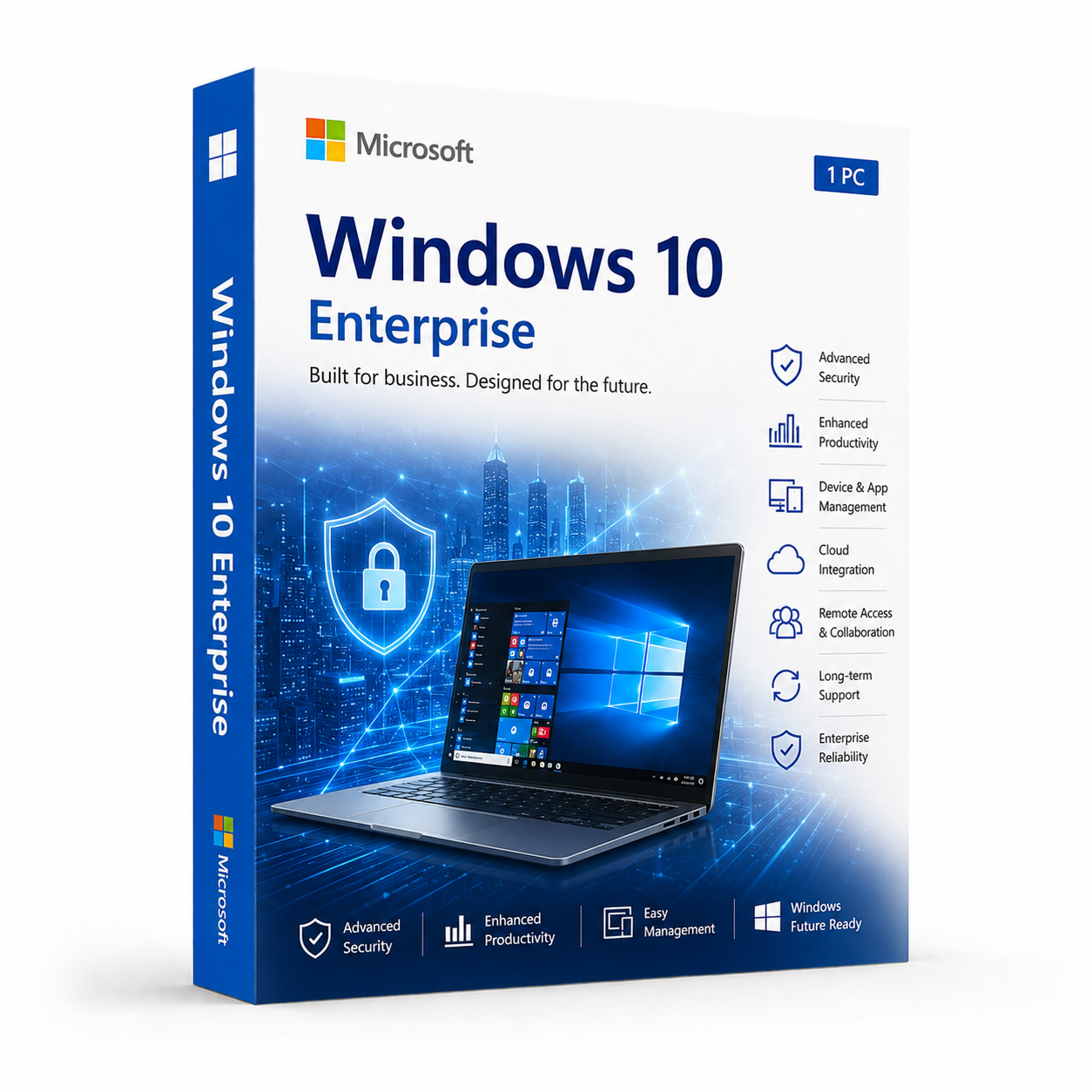
Microsoft Windows 10 Enterprise – Original Activation Key
If your business, organisation, or IT environment demands the highest level of security, control, and manageability that Windows 10 has to offer, there’s only one edition that delivers it without compromise. Windows 10 Enterprise is Microsoft’s most powerful desktop operating system — built from the ground up for organisations that can’t afford to cut corners on security, compliance, or system management. At QuickProductKey, every key we sell is sourced legitimately — no grey-market shortcuts, no reused activations, no risk. Just a clean, verified license delivered straight to your inbox, ready to deploy the moment you need it.
So, What Exactly Is Windows 10 Enterprise?
Windows 10 Enterprise is the top-tier edition of Windows 10, sitting above Home, Pro, and Education in terms of features and capabilities. It was designed specifically for medium to large organisations, IT professionals, and security-conscious businesses that need tools beyond what the Pro edition offers.
Where Pro gives you BitLocker, Remote Desktop, and Group Policy, Enterprise takes all of that and layers on advanced threat protection, granular application control, credential security, and deployment tools that simply don’t exist in any other edition. If you’re running a business network, managing sensitive data, operating in a regulated industry, or simply want the most secure and controllable version of Windows 10 available — Enterprise is the edition built for exactly that.
For IT professionals, system administrators, developers, and businesses purchasing outside of traditional volume licensing agreements, a genuine Enterprise license from QuickProductKey gives you access to every one of those features without the complexity of Microsoft’s corporate procurement process.
What You Actually Get With Windows 10 Enterprise
BitLocker & BitLocker To Go – Full-disk encryption for your internal drives and removable storage devices. Whether someone walks off with your laptop or pulls out a USB drive, your data stays protected. Enterprise extends this to removable media with BitLocker To Go, adding an extra layer of control that Pro doesn’t offer.
Windows Defender Credential Guard – Isolates login credentials in a secure, virtualisation-based environment so that even if malware gets onto your system, it cannot extract your credentials. This is enterprise-grade protection against the kind of attacks that regularly compromise business networks.
Windows Defender Application Guard – Opens untrusted websites and documents in a hardware-isolated container, completely separated from your main operating system. If something malicious runs inside that container, it has no path to your actual system. A critical tool for anyone regularly dealing with external files and unfamiliar web content.
Windows Defender Application Control – Define exactly which applications are trusted and allowed to run on your machines. Anything outside that list simply doesn’t execute. This dramatically reduces the attack surface and prevents unauthorised software from running, even if malware finds a way onto the system.
AppLocker – Granular application whitelisting that lets administrators control which users can run which applications, scripts, and installers. Define rules by publisher, file path, or file hash — and enforce them consistently across your entire environment.
DirectAccess – Give remote workers seamless, always-on connectivity to corporate resources without requiring them to manually connect to a VPN. Their machine connects to the corporate network automatically whenever it has internet access — transparent to the user, fully managed by IT.
BranchCache – Reduce bandwidth consumption across distributed office locations by caching frequently accessed files and content locally. Particularly useful for organisations with multiple sites or remote offices on limited connections.
Remote Desktop – Full remote access to any Enterprise machine from anywhere in the world. Manage systems, provide IT support, or work remotely without being physically present at the machine.
Hyper-V Virtualization – Run virtual machines natively without paying for third-party software. Developers, testers, and system administrators can spin up isolated environments, test configurations, and run multiple operating systems side by side on a single machine.
Windows Sandbox – A lightweight, hardware-isolated virtual environment for safely running untrusted applications and files. Everything inside disappears when you close it — your main system stays completely clean.
Group Policy Management – Enforce configurations, restrict access, and manage behaviour across every machine on your network from a central point. The level of control Group Policy provides in an Enterprise environment is unmatched by any third-party management tool.
Domain Join & Azure Active Directory – Connect to both traditional on-premises Active Directory domains and modern cloud-based Azure AD environments. Full support for hybrid setups makes Enterprise the natural fit for organisations transitioning between on-premises and cloud infrastructure.
Windows Update for Business – Take complete control over when and how updates are deployed across your machines. Defer feature updates, schedule restarts, and manage the entire update lifecycle without disrupting business operations.
Long-Term Servicing Channel (LTSC) Eligibility – Enterprise customers can opt into Microsoft’s Long-Term Servicing Channel, which provides up to ten years of security updates without feature updates — ideal for stable, locked-down environments like industrial systems, medical devices, or point-of-sale terminals.
Windows Hello for Business – Organisation-wide deployment of biometric authentication — face recognition, fingerprint, or PIN tied to device certificates. More secure than passwords and far easier to manage at scale.
Unified Write Filter – Protect your system drive from persistent changes. Any modifications made during a session are discarded on reboot — essential for kiosk machines, shared terminals, and embedded systems.
TPM + Secure Boot + Measured Boot – Hardware-level security that validates the integrity of your system before Windows even loads. Enterprise extends this with Measured Boot, which logs the entire boot process for audit and verification purposes.
Everything Included With Your Purchase
✔ One genuine Windows 10 Enterprise license key
✔ Delivered to your email address immediately after payment is confirmed
✔ Clear, step-by-step activation instructions included
✔ Direct link to Microsoft’s official Windows 10 download page
✔ Lifetime activation — pay once, use permanently
✔ Works on both 32-bit and 64-bit systems
Minimum System Requirements
| Component | What You Need |
|---|---|
| Processor | 1 GHz or faster, 32-bit or 64-bit |
| RAM | 1 GB (32-bit) / 2 GB (64-bit) |
| Storage | 32 GB free space |
| Graphics | DirectX 9 or later with WDDM 1.0 driver |
| Display | 800 x 600 or higher |
| Internet | Required for activation |
Before purchasing, verify that each machine meets these requirements. Microsoft’s PC Health Check tool confirms compatibility quickly and accurately.
How Activation Works — Step by Step
- Place your order — your key arrives by email within minutes
- Head to Microsoft’s official site to download the Windows 10 Enterprise ISO: https://quickproductkey.com/software-downloads/
- Run the installer — fresh installs and in-place upgrades are both fully supported
- Open Settings → Update & Security → Activation
- Click “Change product key” and enter your key
- Hit Activate — you’re done
Stuck at any point? Our support team is available around the clock: https://quickproductkey.com/contact/
Windows 10 Pro vs Education vs Enterprise — Full Comparison
| Feature | Pro | Education | Enterprise |
|---|---|---|---|
| BitLocker Encryption | ✔ | ✔ | ✔ |
| Remote Desktop | ✔ | ✔ | ✔ |
| Hyper-V | ✔ | ✔ | ✔ |
| Group Policy | ✔ | ✔ | ✔ |
| Windows Sandbox | ✔ | ✔ | ✔ |
| AppLocker | ✗ | ✔ | ✔ |
| Credential Guard | ✗ | ✔ | ✔ |
| Application Guard | ✗ | ✗ | ✔ |
| Application Control | ✗ | ✗ | ✔ |
| DirectAccess | ✗ | ✗ | ✔ |
| BranchCache | ✗ | ✗ | ✔ |
| Unified Write Filter | ✗ | ✗ | ✔ |
| LTSC Eligibility | ✗ | ✗ | ✔ |
| Windows Update for Business | ✔ | ✔ | ✔ |
Enterprise sits at the top of the Windows 10 feature hierarchy. If Pro covers your needs, it’s a perfectly capable operating system. But if you need advanced threat protection, application control, DirectAccess, or LTSC support — there’s no substitute for Enterprise.
Who Should Choose Windows 10 Enterprise?
IT Administrators & System Engineers – Managing a business network, deploying machines at scale, or maintaining a secure corporate environment demands tools that only Enterprise provides. Group Policy, AppLocker, DirectAccess, and Azure AD support make large-scale management genuinely manageable.
Security-Focused Businesses – If your organisation handles sensitive client data, financial records, healthcare information, or anything operating under compliance requirements like GDPR, HIPAA, or ISO 27001 — the advanced security stack in Enterprise is not optional. It’s the foundation your security posture is built on.
Developers & DevOps Engineers – Full Hyper-V support, Windows Sandbox, and Application Control give developers a powerful, controlled environment for building, testing, and deploying software without introducing risk to production systems.
Financial & Legal Firms – Industries handling confidential data need BitLocker, Credential Guard, and Application Guard working together. Enterprise provides that layered protection out of the box, without patching together third-party solutions.
Healthcare & Government Organisations – Regulated environments need an OS that supports strict access controls, audit trails, and long-term stability. LTSC eligibility and the full Enterprise security stack make Windows 10 Enterprise the go-to choice in these sectors.
Remote & Distributed Teams – DirectAccess removes the friction of manual VPN connections for remote workers. Combined with Remote Desktop and Azure AD Join, Enterprise gives distributed teams seamless, secure access to everything they need — wherever they’re working from.
Why Customers Choose QuickProductKey
We’re not the cheapest option on the internet — and we don’t try to be. What we offer is reliability. Every key we sell is verified before it goes out. If for any reason activation fails, you get a full refund. No arguing, no runaround.
✔ Keys are genuine — not cracked, not reused
✔ Email delivery in minutes, not hours
✔ One-time payment, lifetime activation
✔ Money-back guarantee if it doesn’t work
✔ 24/7 support from people who actually know the product
✔ Secure checkout via PayPal, Visa, and Stripe
Full refund policy here: https://quickproductkey.com/refund-and-returns-policy/
This is a digital product. Nothing will be posted to you. Your license key is delivered by email as soon as your payment is confirmed.
Be the first to review “Microsoft Windows 10 Enterprise – Original Activation Key”
You must be logged in to post a review.
Related products
Reviews
There are no reviews yet.