


 Instant Delivery to Your Email
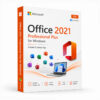
Microsoft Office 2021 Professional Plus – Genuine License Key
The complete Office suite. One purchase. Licensed permanently.
Microsoft Office 2021 Professional Plus is the most comprehensive standalone Office package Microsoft makes for Windows — every core productivity app, every advanced tool, and every professional feature bundled into a single, one-time purchase with no subscription attached. No monthly fees, no renewal deadlines, no account required to keep your software running. Just a genuine license key, a permanent activation, and the full Office 2021 Pro Plus experience from the moment you install.
Why Office 2021 Professional Plus — And Why It Still Makes Sense
Microsoft 365 dominates the conversation, but it comes with a condition that not every user wants to accept: ongoing payments for software that stops working the moment you cancel. For individuals, businesses, and organisations that want the complete Office suite permanently — without committing to a subscription indefinitely — Office 2021 Professional Plus is the definitive answer.
Pro Plus is also the edition that covers the most ground. Where Home & Student gives you the basics and Home & Business adds Outlook, Professional Plus goes further — adding Access, Publisher, and the full suite of advanced tools that power users, data professionals, and business teams actually depend on. This is the version organisations deploy at scale. It’s the version IT departments license for their most demanding users. And with a genuine one-time key, it’s now accessible without the enterprise volume licensing process.
Every App — Fully Licensed, Permanently
Microsoft Word 2021
The definitive word processor with improved collaboration tools, enhanced accessibility features, and new content refinement capabilities. Co-authoring in real time, threaded comments, and advanced formatting controls — all fully intact in the perpetual release.
Microsoft Excel 2021
Spreadsheet power built for serious data work. Excel 2021 introduces XLOOKUP, dynamic arrays, LET function, and new data types that bring meaningful analytical capability to the perpetual edition. Pivot tables, Power Query, advanced charting, and full macro support — everything the Pro Plus tier unlocks is here.
Microsoft PowerPoint 2021
Professional presentation design with new transition effects, improved Presenter Coach, and enhanced collaboration features. Build, rehearse, and deliver presentations with the tools used across every industry — fully offline, no subscription required.
Microsoft Outlook 2021
Email, calendar, contacts, and task management in one unified interface. Outlook 2021 brings improved search, better focused inbox filtering, and enhanced Teams integration for organisations running hybrid workflows. The most capable standalone email client in the Windows ecosystem.
Microsoft OneNote
Structured note-taking that integrates naturally with the rest of the Office suite. Capture meeting notes, build research notebooks, and organise ideas across every area of your work — all synced through OneDrive when you need cross-device access.
Microsoft Access 2021
A powerful relational database tool available exclusively in Professional Plus and above. Build, manage, and query databases without enterprise-grade infrastructure — essential for data professionals, analysts, and business users managing structured information at scale.
Microsoft Publisher 2021
Desktop publishing and layout design built into the Office suite. Create marketing materials, newsletters, brochures, and print-ready documents with precise layout control — a capability unavailable in any lower Office edition.
Microsoft Teams
Integrated communication and collaboration built into the Professional Plus suite. Chat, video calls, file sharing, and meeting management — all connected to the Office apps you’re already using.
Skype for Business
Enterprise-grade communication tools for organisations still running on-premises Skype for Business infrastructure — included and fully functional in the Pro Plus package.
Key Features Across the Suite
Real-Time Co-Authoring
Work on the same document, spreadsheet, or presentation simultaneously with colleagues — changes appear live, comments are threaded, and version history is maintained automatically across Word, Excel, and PowerPoint when files are stored in OneDrive or SharePoint.
Advanced Data Tools in Excel
XLOOKUP replaces VLOOKUP with a more powerful, flexible lookup function. Dynamic arrays let formulas spill results across multiple cells automatically. LET function enables cleaner, more efficient formula construction. New data types pull live information directly into spreadsheets.
Information Rights Management
Control who can access, print, forward, or edit sensitive documents — apply permissions at the file level and enforce them regardless of where the document travels. An enterprise-grade capability available exclusively in Professional Plus.
Group Policy Support
Deploy and manage Office 2021 Pro Plus across an organisation using Group Policy — control feature availability, enforce security settings, and standardise configurations at scale. Essential for IT administrators managing multi-machine deployments.
Full Offline Functionality
Every app in the suite works completely offline. No internet connection required after activation — your productivity tools function regardless of network availability.
SharePoint & OneDrive Integration
Save, sync, and collaborate through Microsoft’s cloud storage infrastructure — directly from within every Office app. Files stored in OneDrive are accessible from any device and automatically backed up.
Advanced Publisher Tools
Professional-grade layout and design capabilities that go beyond what Word’s formatting tools can achieve — precise object placement, master pages, colour management, and print-ready output built for marketing and communications professionals.
Access Database Engine
Build relational databases, create custom forms and reports, and manage structured data with a full-featured database application — no additional software required. Exclusive to Professional Plus and above.
Mobile App Compatibility
Your Office license works alongside the free Office mobile apps — Word, Excel, PowerPoint, and Outlook on Android and iOS — keeping your workflow connected across devices.
Full Windows Integration
Office 2021 Pro Plus integrates natively with Windows 10 and Windows 11 — taskbar pinning, file association, search indexing, and Windows Hello authentication all work seamlessly out of the box.
Everything Included With Your Purchase
✔ One genuine Microsoft Office 2021 Professional Plus license key
✔ Delivered to your inbox immediately after payment is confirmed
✔ Full suite: Word, Excel, PowerPoint, Outlook, OneNote, Access, Publisher, Teams
✔ Step-by-step activation instructions included
✔ Direct link to Microsoft’s official Office download page
✔ Lifetime activation — one-time purchase, permanently licensed
✔ Licensed for one PC
System Requirements
| Component | Requirement |
|---|---|
| Operating System | Windows 10 or Windows 11 (64-bit recommended) |
| Processor | 1.6 GHz+, 2 cores minimum |
| RAM | 4 GB (64-bit), 2 GB (32-bit) |
| Storage | 4 GB free space |
| Display | 1280 × 768 resolution or higher |
| Internet | Required for activation and OneDrive sync |
| Microsoft Account | Required for activation |
Full compatibility details available on Microsoft’s official support page.
Office 2021 System Requirements
How Activation Works — Step by Step
- Complete your purchase — your license key arrives by email within minutes
- Download Office 2021 Professional Plus from Microsoft’s official site: Download Here
- Run the installer and follow the on-screen setup process
- Open any Office app — Word, Excel, or PowerPoint
- Click File → Account → Activate Product
- Sign in with your Microsoft account when prompted
- Enter your license key in the activation window
- Click Activate — all apps permanently licensed on your PC
Need help at any step? Support is available around the clock: Contact Support
Office 2021 Edition Comparison — Which Is Right for You?
| Feature | Home & Student | Home & Business | Professional Plus |
|---|---|---|---|
| Word | ✔ | ✔ | ✔ |
| Excel | ✔ | ✔ | ✔ |
| PowerPoint | ✔ | ✔ | ✔ |
| OneNote | ✔ | ✔ | ✔ |
| Outlook | ✗ | ✔ | ✔ |
| Access | ✗ | ✗ | ✔ |
| Publisher | ✗ | ✗ | ✔ |
| Teams | ✗ | ✗ | ✔ |
| Info Rights Mgmt | ✗ | ✗ | ✔ |
| Group Policy Support | ✗ | ✗ | ✔ |
| Commercial Use | ✗ | ✔ | ✔ |
Professional Plus is the only standalone Office edition that includes Access, Publisher, Information Rights Management, and Group Policy support. For any user whose workflow touches database management, desktop publishing, or organisational IT deployment, it’s the only edition that covers the full range.
Office 2021 Pro Plus vs Microsoft 365 — Honest Comparison
| Aspect | Office 2021 Pro Plus | Microsoft 365 |
|---|---|---|
| Payment Model | One-time purchase | Monthly/annual subscription |
| Apps Included | Full Pro Plus suite | Core apps + cloud services |
| License Duration | Permanent | Active while subscribed |
| Access & Publisher | ✔ | Limited availability |
| OneDrive Storage | 5 GB (free tier) | 1 TB included |
| Feature Updates | Security updates only | Ongoing new features |
| Multi-Device Use | One PC | Up to 5 devices |
| Group Policy Support | ✔ | ✔ |
| Price Over 5 Years | Pay once | Recurring cost |
For users who need the complete Pro Plus app set permanently on one machine — particularly Access and Publisher — Office 2021 Professional Plus delivers more than Microsoft 365 does at the equivalent tier, without the subscription commitment.
Who Is This For?
- Business professionals who need the complete Office suite permanently on their work PC
- Data analysts and database managers who rely on Access for structured data work
- Marketing and communications teams who use Publisher for layout and print design
- IT administrators deploying Office across an organisation with Group Policy management
- Freelancers and consultants who need full Office compatibility for client deliverables
- Small business owners licensing a workstation with the most comprehensive Office package available
- Power users who want every Office app available without a subscription
- Anyone upgrading from Office 2016, 2019, or an older Pro Plus installation
Why Customers Choose QuickProductKey
We’re not the cheapest option on the internet — and we don’t try to be. What we offer is reliability. Every key is verified before it goes out. If activation fails for any reason, you get a full refund — no questions, no delays.
✔ All keys are genuine — not cracked, not reused
✔ Email delivery in minutes, not hours
✔ One-time payment, lifetime activation
✔ Money-back guarantee if the key doesn’t work
✔ 24/7 support from people who actually know the product
✔ Secure checkout via PayPal, Visa, and Stripe
Full refund policy: Refund & Returns Policy
This is a digital product. Nothing will be posted to you. Your license key is delivered by email the moment your payment is confirmed.
Be the first to review “Microsoft Office 2021 Professional Plus – Instant License Key”
You must be logged in to post a review.
Related products



Reviews
There are no reviews yet.